Best Website Monitoring Tools A Deep Dive
Best website monitoring tools are essential for any online presence, whether you run a bustling e-commerce store or a quiet blog. They act as your digital sentinels, constantly watching over your site’s health and performance. From ensuring your site is always up and running to pinpointing potential security threats, these tools offer invaluable insights into your website’s well-being. This exploration delves into the world of website monitoring, covering everything from uptime to performance, and security, providing a comprehensive guide to help you choose the best solution for your needs.
This guide will walk you through various website monitoring tools, highlighting key features, benefits, and potential drawbacks. We’ll compare different solutions based on pricing, functionalities, and ease of use, so you can make an informed decision. From simple uptime checks to sophisticated performance analysis, we’ll cover it all. Get ready to uncover the best website monitoring tools for your specific needs.
Introduction to Website Monitoring Tools
Website monitoring tools are essential for maintaining a robust and reliable online presence. They provide a comprehensive view of your website’s health, performance, and security, allowing you to proactively address issues before they impact your users. A well-functioning website monitoring system is critical for businesses of all sizes, ensuring seamless operation and user satisfaction.Website monitoring is not just about checking if your website is up; it’s about understanding its behavior and responsiveness.
This understanding enables you to make informed decisions about resource allocation, identify potential problems, and optimize performance. This proactive approach is vital in today’s competitive digital landscape, where a few seconds of downtime or a sluggish website can lead to significant loss of revenue and damage to your brand reputation.
Website Monitoring Use Cases
Website monitoring is crucial across various types of websites, offering specific benefits depending on the website’s function. E-commerce websites, for example, need to ensure their online store is accessible and performing at peak speed, particularly during peak shopping hours. Slow loading times or frequent outages can result in lost sales and frustrated customers. Blogs and news websites rely on monitoring to maintain a consistent flow of information and ensure readers have a smooth experience accessing articles and updates.
In the case of social media platforms, monitoring can identify and resolve issues impacting user engagement and functionality.
Keeping your website up and running smoothly is crucial, especially in today’s digital world. Thankfully, there are excellent website monitoring tools available to help you stay on top of things. For instance, a recent news story highlights a driver arrested for DUI in Saratoga after hitting a parked car, which sadly underscores the importance of reliable systems for all types of operations.
These monitoring tools can alert you to any issues, ensuring your site is accessible 24/7, just like a well-maintained vehicle on the road.
Common Functionalities of Website Monitoring Tools
Website monitoring tools offer a variety of functionalities to ensure a smooth online experience. These tools typically track website uptime, monitor page load times, and detect performance bottlenecks. They can also provide detailed reports and alerts to inform administrators about potential issues, allowing for prompt response and resolution. Comprehensive monitoring systems frequently include security features to detect and prevent malicious activity, such as DDoS attacks or data breaches.
This proactive approach helps safeguard the website and its users.
Comparison of Website Monitoring Tool Categories
| Category | Description | Examples | Key Features |
|---|---|---|---|
| Uptime Monitoring | This category focuses on ensuring your website is consistently available to users. It monitors the website’s status and identifies any periods of downtime. | Pingdom, Uptime Robot, Monitor.us | Regular checks of website availability, detailed reports on downtime, automated alerts for outages, historical data for trend analysis. |
| Performance Monitoring | Performance monitoring tools delve deeper, measuring page load times, server response times, and other performance indicators. They identify bottlenecks and optimize website speed. | New Relic, AppDynamics, Dynatrace | Real-time performance metrics, detailed analysis of resource usage, identification of performance bottlenecks, suggestions for optimization. |
| Security Monitoring | Security monitoring tools actively detect and prevent security threats, such as DDoS attacks, malware, and unauthorized access. These tools are crucial for protecting sensitive data and maintaining user trust. | Sucuri, Cloudflare, Imperva | Detection of malicious activities, prevention of security breaches, real-time alerts for security threats, comprehensive security audits. |
Key Features and Benefits of Effective Tools
Website monitoring tools are crucial for maintaining a healthy and functioning online presence. These tools act as vigilant guardians, ensuring your website is always accessible and performing optimally. By proactively identifying and resolving issues, they prevent frustrating downtime and maintain a positive user experience. Choosing the right tool is paramount for protecting your investment and reputation.Effective website monitoring tools go beyond simple uptime checks.
They provide a comprehensive view of your website’s health, performance, and security, allowing you to address potential problems before they impact your users. This proactive approach minimizes the risk of lost revenue, damaged brand reputation, and frustrated customers.
Essential Features of Top-Tier Tools
A robust website monitoring toolset must possess several key features. These include real-time performance monitoring, detailed reporting, and comprehensive alerting systems. They should track key metrics like response times, error rates, and server load, providing valuable insights into website performance. Additionally, they should offer customization options to tailor the monitoring process to specific needs.
- Real-time monitoring: This feature allows immediate detection of performance issues, enabling swift responses to problems. Real-time monitoring systems instantly track metrics like page load times, error rates, and server response, enabling quick troubleshooting.
- Comprehensive reporting: Detailed reports provide a historical overview of website performance. These reports allow for trend analysis, helping to identify patterns and predict potential issues before they escalate.
- Alerting systems: Automated alerts notify administrators of critical issues, enabling immediate action. These alerts can be customized to specific thresholds and types of events, ensuring timely responses to critical incidents.
- Customizable dashboards: Users can tailor dashboards to visualize key metrics, enabling quick identification of performance issues. These customizable dashboards allow administrators to focus on relevant data and streamline the monitoring process.
Benefits for Website Owners
Implementing effective website monitoring tools offers numerous benefits for website owners. These tools provide a proactive approach to maintenance, minimizing downtime and maximizing website performance. They empower owners to anticipate and address potential problems, ensuring a positive user experience.
- Improved uptime: Proactive monitoring prevents downtime by identifying and resolving issues quickly. This proactive approach minimizes the risk of lost revenue and ensures consistent website accessibility.
- Enhanced performance: By identifying and resolving performance bottlenecks, website monitoring tools ensure optimal website speed and responsiveness. Improved performance leads to a better user experience and increased engagement.
- Reduced support costs: Proactive issue resolution minimizes the need for extensive support intervention, reducing operational costs. The timely identification and resolution of problems reduce the need for extensive support interventions, saving time and resources.
- Data-driven decisions: Monitoring tools provide data-driven insights into website performance, allowing for informed decisions about optimization strategies. The data collected from monitoring tools provides a foundation for making strategic decisions to improve website performance.
Real-time Monitoring and Alerts
Real-time monitoring and alerts are critical components of effective website monitoring tools. These features provide immediate notification of performance issues, enabling rapid responses to prevent downtime. By reacting swiftly to problems, website owners can minimize the negative impact on users and maintain a positive reputation.
- Instantaneous issue detection: Real-time monitoring tools immediately detect performance issues, allowing for swift responses. This proactive approach ensures that issues are resolved before they impact user experience.
- Rapid response to problems: Immediate alerts trigger quick intervention, minimizing the duration of downtime and preventing further damage. Swift responses to issues limit the duration of disruptions and minimize the negative consequences.
- Proactive problem resolution: Real-time monitoring allows for proactive identification and resolution of potential issues. This approach prevents problems from escalating into major outages, safeguarding website availability.
Examples of Preventing Downtime and Improving Performance
A website experiencing high server load, for instance, can be identified through real-time monitoring. Alerts trigger administrators to investigate the cause and take appropriate action, like scaling resources or optimizing code. This proactive approach prevents prolonged downtime and maintains website performance. Similarly, monitoring can detect slow-loading pages and suggest optimizations to improve user experience. Effective monitoring identifies and resolves issues like database errors or server overload, preventing catastrophic downtime and maintaining a seamless user experience.
Role of Monitoring in Identifying and Resolving Issues
Website monitoring plays a crucial role in proactively identifying and resolving issues. Tools can detect patterns and trends, allowing administrators to anticipate potential problems. This proactive approach enables swift responses, minimizing downtime and ensuring optimal performance.
Comparison of Monitoring Solutions
| Monitoring Solution | Pros | Cons |
|---|---|---|
| Solution A | Comprehensive feature set, robust reporting, excellent real-time monitoring. | Slightly higher price point, learning curve for advanced features. |
| Solution B | User-friendly interface, affordable pricing, excellent basic monitoring. | Limited reporting capabilities, less robust real-time monitoring features. |
Analyzing Different Website Monitoring Tools
Choosing the right website monitoring tool can significantly impact your online presence and business operations. Understanding the strengths and weaknesses of different tools, along with their pricing models, is crucial for making an informed decision. This section delves into the comparison of various tools, highlighting their key features, pricing structures, and user-friendliness.Website monitoring tools offer a wide range of capabilities, from basic uptime checks to comprehensive performance analysis.
The ideal tool depends on the specific needs of the website owner, ranging from small businesses to large enterprises. Analyzing different tools empowers you to select the solution that best fits your budget, technical expertise, and desired level of monitoring.
Keeping websites running smoothly is crucial, and great website monitoring tools are essential for any online presence. Recently, I learned about the impressive miplitas nonprofit awarded rotary foundation grant, miplitas nonprofit awarded rotary foundation grant – a fantastic achievement! This highlights the importance of reliable systems, which are, of course, directly related to effective website monitoring.
These tools can ensure your website is always up and running, crucial for any online business.
Comparison of Pricing Models, Best website monitoring tools
Different website monitoring tools employ various pricing models, each catering to diverse needs and budgets. Some tools offer tiered pricing plans, providing increasing features and support levels as the plan’s price increases. Others may offer a freemium model, with a basic version available for free and more advanced features requiring a paid subscription. A key factor to consider is whether the pricing model includes essential features such as custom alerts, detailed reporting, and dedicated support.
A transparent pricing model ensures that the user understands the value proposition associated with each price tier.
Summary of Popular Monitoring Tools
This table summarizes the key features and pricing of popular website monitoring tools, offering a concise comparison:
| Tool Name | Key Features | Pricing | Target Audience |
|---|---|---|---|
| UptimeRobot | Comprehensive uptime monitoring, customizable alerts, detailed reports, integrations with other services. | Free plan with limited features, paid plans starting at $9/month. | Small businesses, individuals, and those seeking basic monitoring. |
| Pingdom | Extensive performance monitoring, real-time data analysis, advanced dashboards, API integrations. | Paid plans starting at $19.95/month for basic plans, significantly increasing with more features and users. | Businesses requiring in-depth performance analysis, including larger enterprises and e-commerce platforms. |
| Monitorama | User-friendly interface, robust monitoring features, custom alerts, and detailed reports. | Starts at $10/month, with plans increasing in features and cost. | Businesses of varying sizes looking for a comprehensive yet intuitive solution. |
| CloudFlare | Free plan with basic features; Paid plans with advanced features, including real-time performance monitoring and detailed reports. | Varying plans, with free options available for basic usage. | E-commerce websites and companies with large-scale web traffic needing a comprehensive solution. |
Importance of User-Friendly Interfaces and Intuitive Dashboards
A user-friendly interface and intuitive dashboard are paramount for effective website monitoring. An intuitive dashboard allows users to quickly identify performance issues, enabling swift resolution and minimizing downtime. Clear visualizations, easy navigation, and readily accessible data are critical for effective problem-solving. Tools with well-designed interfaces reduce the learning curve and empower users to efficiently monitor their websites.
Intuitive dashboards, with their concise displays of key performance indicators (KPIs), aid in rapid identification of issues and timely responses.
Advanced Monitoring Capabilities: Best Website Monitoring Tools
Website monitoring tools are no longer limited to basic uptime checks. Modern tools offer sophisticated features for proactive issue identification and streamlined management. Advanced capabilities allow for deeper insights into website performance, enabling businesses to address potential problems before they impact users.Advanced monitoring functionalities go beyond the basics, allowing for customized responses to various situations. This tailored approach is crucial for maintaining optimal website performance and user experience.
Choosing the right website monitoring tools is crucial for any online business. A recent article in Silicon Valley Reads, a fascinating read, delves deep into the potential of AI, silicon valley reads featured author takes deep dive into ai , which could revolutionize how we monitor websites for performance and security. Ultimately, understanding emerging technologies like AI is a key part of selecting the best website monitoring tools for your needs.
Customizable alerts and integrations with other platforms further enhance the monitoring process, enabling proactive responses to potential issues.
Custom Alerts and Integrations
Customizable alerts empower users to receive notifications specific to their needs. Instead of generic alerts for all errors, users can set up alerts for critical errors, specific slowdowns, or unusual traffic patterns. This granular control ensures that teams are informed about problems that require immediate attention, leading to quicker resolution times. Integrations with other platforms like ticketing systems or communication tools streamline the issue resolution process by automating tasks and providing a unified view of the website’s health.
This automation reduces response times and improves overall efficiency.
API Access and Customization Options
API access is crucial for advanced users and businesses requiring high levels of customization. With API access, users can programmatically interact with the monitoring tool, allowing for seamless integration with other systems and processes. This flexibility enables the creation of custom dashboards, reports, and workflows tailored to the specific needs of each organization.
Reporting and Analytics
Comprehensive reporting and analytics are essential for understanding website performance trends and identifying potential issues. Detailed performance reports provide insights into response times, error rates, and traffic patterns over time. This data allows for identifying performance bottlenecks, optimizing website configurations, and predicting future issues. Historical data is invaluable for trend analysis and performance comparisons. This historical perspective allows businesses to track progress and identify areas where improvements are needed.
Accurate reports provide a clear picture of website health, allowing businesses to make data-driven decisions.
API Integrations
Integrating monitoring tools with other platforms enhances the overall workflow. This integration allows for seamless data flow between systems, streamlining the issue resolution process.
| Tool | API Integrations | Description |
|---|---|---|
| Tool A | Slack, Jira, PagerDuty | Allows for automatic notifications and issue tracking in Slack and Jira, and triggers alerts to PagerDuty. |
| Tool B | Zendesk, Salesforce, Datadog | Integrates with Zendesk for support tickets, Salesforce for customer data, and Datadog for comprehensive metrics and monitoring. |
| Tool C | Intercom, Google Analytics, Segment | Provides integrations with Intercom for customer communication, Google Analytics for website traffic analysis, and Segment for event tracking and data enrichment. |
Performance Reports and Historical Data
Detailed performance reports provide a comprehensive view of website performance over time. These reports often include metrics like response times, error rates, and traffic volume. Historical data allows for identifying trends and patterns in website performance. For example, a sudden spike in error rates might indicate a server overload or a software bug. Analysis of historical data can reveal underlying issues and help in proactive maintenance.
By analyzing historical data, businesses can identify potential problems before they impact users, minimizing downtime and improving the overall user experience. This historical context allows for informed decision-making regarding resource allocation and maintenance schedules.
Practical Implementation and Case Studies
Putting website monitoring tools into action requires careful planning and execution. Choosing the right tool for your specific needs is crucial, but equally important is understanding how to configure and leverage its features effectively. This section delves into practical implementation, providing step-by-step guidance and real-world examples to demonstrate successful application.Effective monitoring isn’t a one-time setup; it’s an ongoing process requiring review and adjustment.
This section emphasizes the importance of adapting your strategy to changing traffic patterns and website performance. We’ll explore how to fine-tune your monitoring approach to ensure optimal performance during peak hours.
Setting Up and Configuring Monitoring Tools
Proper setup is the foundation of any successful monitoring strategy. Different tools have varying configuration processes, but the core principles remain consistent. Begin by identifying key performance indicators (KPIs) crucial to your website’s health. These metrics might include response times, error rates, server load, and uptime. Next, define thresholds for these metrics.
Exceeding these thresholds could indicate a problem requiring attention.
- Installation: Tools often come with detailed installation guides. Follow these instructions meticulously. Crucial aspects include verifying correct software dependencies and permissions. Ensure the monitoring tool is installed on a server with adequate resources.
- Configuration: Once installed, configure the tool to monitor your specific website. This involves entering your website’s URL, specifying the monitoring points (e.g., different pages, key functionalities), and selecting the desired metrics. You’ll need to configure alerting systems to notify you of potential issues.
Monitoring During Peak Traffic Hours
Predicting and handling peak traffic is a vital aspect of website reliability. Understanding how your website performs under pressure allows proactive intervention. Monitoring tools provide valuable insights into this. For instance, they reveal whether your website can handle the anticipated traffic volume.
- Traffic Forecasting: Using historical data and traffic patterns, tools can help anticipate peak traffic periods. This enables preemptive monitoring.
- Performance Analysis: During peak hours, closely monitor response times, server load, and error rates. Identifying bottlenecks during these periods is crucial for optimization. Look for spikes in specific metrics.
Case Studies: Successful Application
Real-world examples demonstrate the value of effective website monitoring. One company, “E-Commerce Solutions,” experienced significant performance degradation during peak sales seasons. By implementing a robust monitoring tool, they identified and addressed bottlenecks in their payment processing system, leading to a substantial improvement in customer experience.
- Real-time Issue Detection: Monitoring tools allow for immediate identification of performance issues. A case study of a news website showed that quick detection of server overload led to the prevention of significant traffic loss.
- Proactive Maintenance: Proactive identification of potential problems through monitoring enables preemptive maintenance. This minimizes downtime and disruption. A gaming platform used monitoring tools to predict potential server overload before it impacted gameplay, preventing a critical disruption.
Monitoring Dashboards
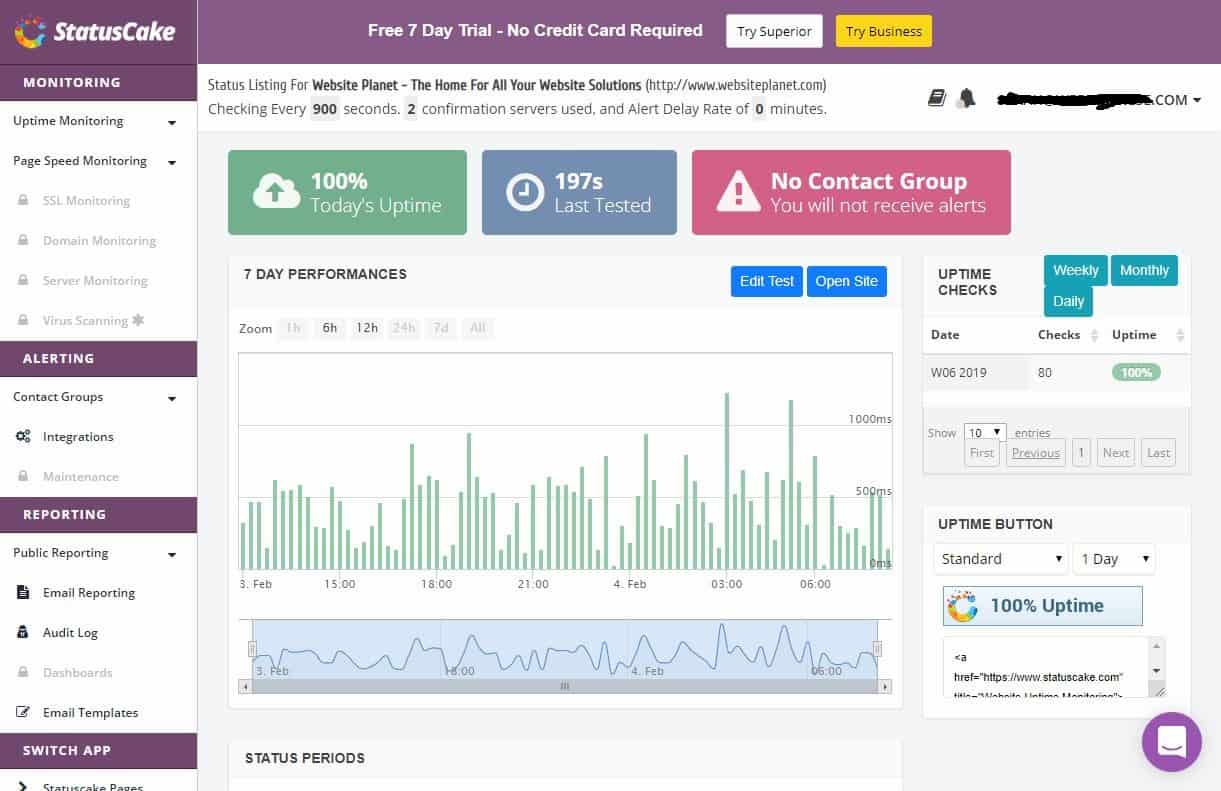
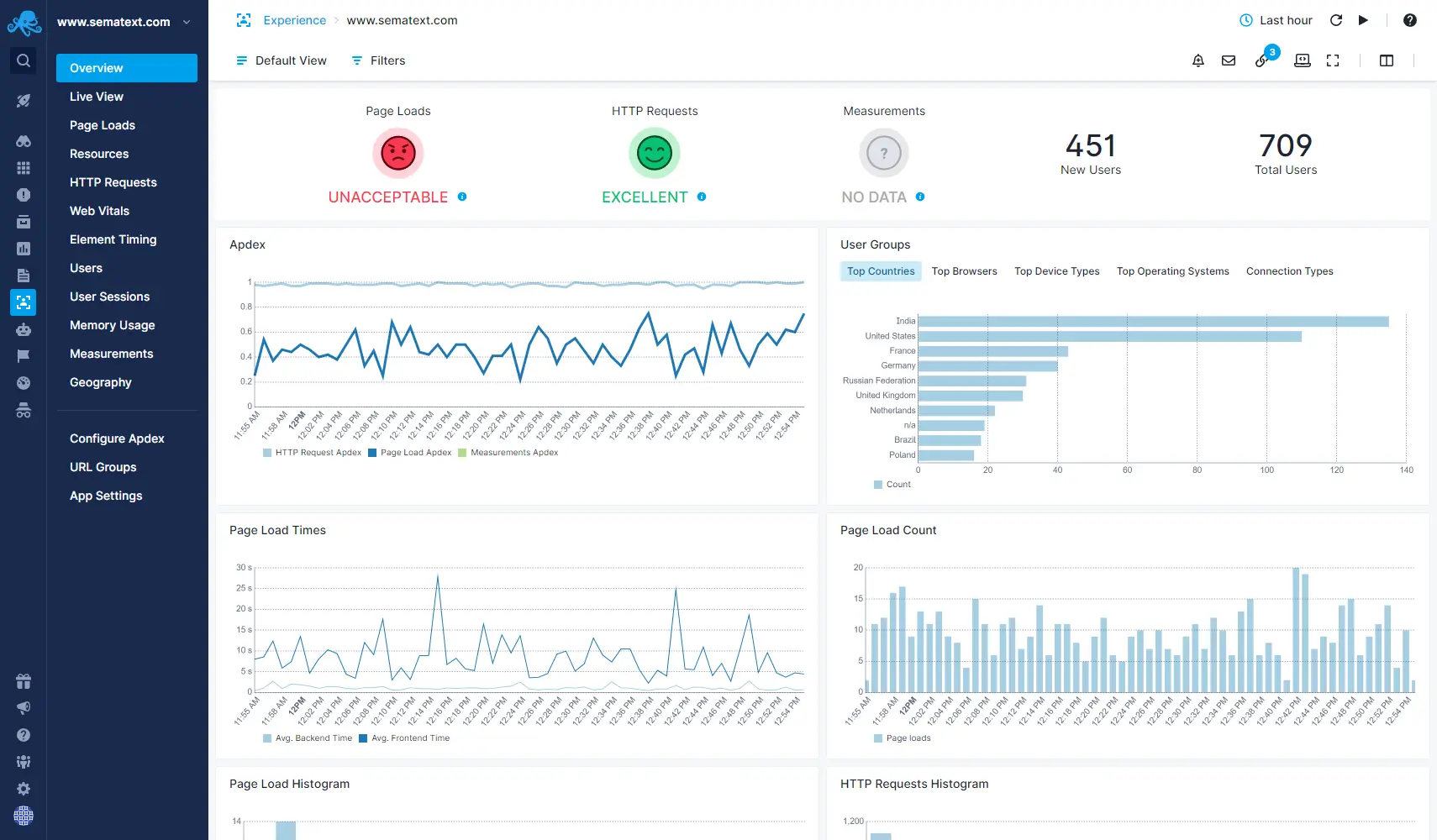
Monitoring dashboards provide a comprehensive view of website performance. A typical dashboard displays key metrics in a visually intuitive manner. For instance, a graph might show website uptime over time, with shaded areas indicating periods of downtime. Charts could illustrate response times and server load.
- Visualization: Effective dashboards use charts and graphs to present data clearly and concisely.
- Real-time Data: Real-time data updates allow for immediate responses to performance issues.
Regular Review and Adjustment
Website monitoring is an ongoing process requiring regular evaluation and adjustments. As your website evolves, its needs may change. Regular reviews of monitoring strategies ensure that the approach remains relevant and effective.
- Periodic Assessments: Periodically review your monitoring strategy to adapt to evolving website needs.
- Dynamic Adjustment: Continuously adjust your monitoring setup based on observed performance and traffic patterns.
Closing Summary
In conclusion, understanding and utilizing the right website monitoring tools is crucial for maintaining a successful online presence. We’ve explored the various aspects of website monitoring, from fundamental functionalities to advanced features. By choosing the right tool and implementing a robust monitoring strategy, you can proactively identify and resolve issues, ultimately ensuring a seamless user experience and safeguarding your website’s performance and security.
Ultimately, the best website monitoring tool depends on your specific needs, budget, and technical expertise. This guide aims to equip you with the knowledge to make the best choice.