Mastering the Apple Contacts App: Essential Tips, Hidden Features, and Advanced Management Strategies for iPhone, iPad, and Mac

The digital address book has evolved far beyond a simple repository of names and phone numbers. In the modern ecosystem of consumer technology, applications like Apple’s native Contacts app serve as the foundational bedrock for all interpersonal and professional communication across multiple devices. While it often appears on the surface to be a utilitarian and straightforward tool, a deep examination of its architecture reveals a robust suite of hidden capabilities. Users frequently overlook functionalities such as automated duplicate detection, advanced smart lists, and rapid bulk management actions designed to streamline digital organization.
As mobile operating systems become increasingly complex, mastering native tools has grown critical for digital efficiency and data privacy. Apple’s continuous integration of iOS, iPadOS, and macOS ecosystems allows for seamless synchronization, yet it also introduces unique organizational hurdles. Managing thousands of contacts accrued over years of device upgrades can quickly become overwhelming without leveraging the proper utility features built directly into the operating system.
Comprehensive Duplicate Resolution and Maintenance
One of the most persistent issues facing digital users is the accumulation of duplicate entries. These redundancies often occur due to multi-device synchronization, importing vCards from various sources, or manually entering contact details across different platforms over time. Historically, resolving this required tedious manual searching and deletion.
Within the iOS environment, Apple addresses this by automatically scanning the address book and presenting a dedicated prompt at the top of the contact interface when duplicates are detected. Users can review and merge these entries with minimal friction. However, for macOS users, the management of duplicates requires a slightly more deliberate approach. By opening the Contacts application on a Mac and navigating to the top menu bar to select the Card menu, users can access the "Look for Duplicates" function. This utility analyzes the entire database, identifies matching criteria across names, phone numbers, and email addresses, and permits rapid consolidation or deletion.

Regular maintenance of these databases not only preserves storage efficiency but also prevents communication errors, such as messaging outdated numbers or dispatching confidential information to incorrect email aliases.
Advanced Multi-Selection Gestures for Bulk Actions
Executing bulk actions on mobile devices has traditionally been cumbersome compared to desktop environments, where holding down the Shift or Control keys allows for instantaneous multi-selection. On macOS, users can still rely on these standard keyboard shortcuts within the Contacts application to select contiguous or disparate entries using arrow keys and mouse clicks.
For iPhone and iPad users, Apple implements a specialized, albeit hidden, multi-selection gesture to bridge the usability gap. By placing two fingers on the contact list and swiping upward or downward, users can rapidly highlight multiple entries simultaneously. Once an initial batch is selected, users can scroll through the directory and continue the two-finger gesture to expand their selection pool. This method represents the most efficient pathway for executing batch operations, such as mass exporting, sharing, or deleting outdated contacts, without requiring individual user interface interactions for each record.
Optimizing Privacy and Sharing Workflows
The act of sharing contact information has significant privacy implications. When users share a standard contact card through iOS, the system typically prompts them to select specific fields for transmission. This protective measure ensures that sensitive personal data—such as home addresses, private telephone numbers, romantic anniversary dates, or internal nicknames—is not inadvertently disclosed to unintended recipients.
However, this added layer of security introduces friction into everyday communication workflows. To bypass this friction while maintaining a degree of control, users often resort to copying and pasting contact text directly into messaging applications. Within the native Messages app, a user can hold down on a contact’s name within the Contacts application, select the copy function, and paste the plaintext data directly into an active iMessage chat. While this workaround does not currently extend compatibility to third-party messaging utilities like WhatsApp or Signal, it provides a streamlined alternative for standard SMS and iMessage exchanges.

Furthermore, the integration of third-party communication platforms within the native Contacts app has matured significantly. By holding down the designated call or message buttons within an individual contact profile on iOS, users can access a contextual menu revealing alternative applications linked to that specific phone number or identifier. This functionality allows individuals to initiate WhatsApp, Signal, or Telegram conversations and voice calls directly from the native interface, bypassing the need to grant third-party applications continuous, broad access to the entire local address book—a practice often discouraged from a privacy standpoint.
Streamlining Deletion and Data Portability
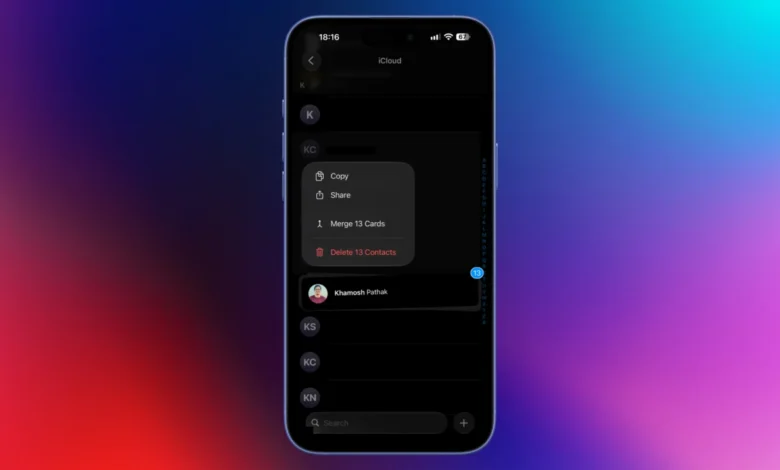
Digital hygiene frequently necessitates the removal of obsolete entries, such as acquaintances from distant years or professional contacts whose utility has expired. Apple intentionally designs the deletion process on mobile devices to involve multiple confirmation steps to prevent accidental data loss. To expedite this process, users can hold down on any contact name to trigger a popover menu containing a direct deletion option. When combined with the aforementioned two-finger multi-selection gesture, users can highlight a cohort of outdated entries, invoke the popover menu, and execute a mass deletion command, significantly reducing the time required to purge unwanted records.
For comprehensive data portability and external backups, macOS remains the primary platform. Users can export their entire address book by navigating through the Mac application’s file hierarchy: File, followed by Export, and then Export vCard. This generates a standard .vcf file compatible with alternative services such as Google Contacts, Microsoft Outlook, and various cloud-based address management systems. Additionally, macOS provides an integrated utility to export contacts directly into a structured PDF document, serving as a physical or offline archival reference.
Customization of Contact Templates
Standardized contact templates often contain numerous auxiliary fields—such as phonetic names, maiden names, custom labels, and social profile links—that the average user rarely utilizes. When generating new records, the presence of these unused blank fields can clutter the interface.
Users can customize the foundational structure of new contact cards via the macOS application by navigating to Card, selecting Add Field, and finally choosing Edit Template. By refining this template to display only essential categories, such as primary telephone numbers and corporate email addresses, users can accelerate the data entry process and maintain a uniform aesthetic across their digital directory.

Smart Lists and Dynamic Categorization
As address books expand, locating a newly added contact whose name has been forgotten—such as a service technician, a real estate agent, or a retail salesperson met briefly—presents a distinct challenge. Traditional alphabetical sorting fails in these scenarios.
To resolve this, macOS users can implement Smart Lists, a dynamic filtering tool that automatically categorizes entries based on predefined parameters. By navigating to File and selecting New Smart List, users can configure criteria such as cards that "have changed in" a specific timeframe (for example, the last 10 days). This generates a live folder that automatically updates to reflect recently created or modified records, allowing the user to easily identify recent additions without manually scrolling through hundreds of entries.
Smart Lists also serve structural organizational functions for professional networking. By assigning specific organizational tags or company names within contact profiles, users can establish automated groups. These lists dynamically aggregate former colleagues, academic peers, or industry associates, simplifying group messaging and targeted communication campaigns without requiring manual list maintenance.
The Evolution of Digital Business Cards via NameDrop
The introduction of NameDrop within the Apple ecosystem modernized the exchange of contact details by leveraging proximity-based device communication. By bringing two compatible Apple devices into close physical contact, users can trigger a full-screen interface that facilitates the rapid, contactless transfer of contact coordinates.
However, the convenience of NameDrop underscores the importance of curating one’s personal contact card to safeguard personal privacy. Because NameDrop transmits information based on the user’s primary designated profile, exposing residential addresses or private personal details during casual interactions poses a security risk.

Security experts recommend that users audit and update their primary contact card regularly. By navigating to the top of the Contacts application on iOS, selecting their own name profile, and utilizing the edit function, users can purge extraneous personal details before utilizing proximity sharing features. Replacing candid photographs with neutral professional headshots or minimalist graphic avatars further enhances user privacy in public and professional environments, ensuring that modern convenience does not compromise personal data security.