
Firefox Introduces "Mini Window" Feature to Revolutionize Browser Multitasking and Productivity

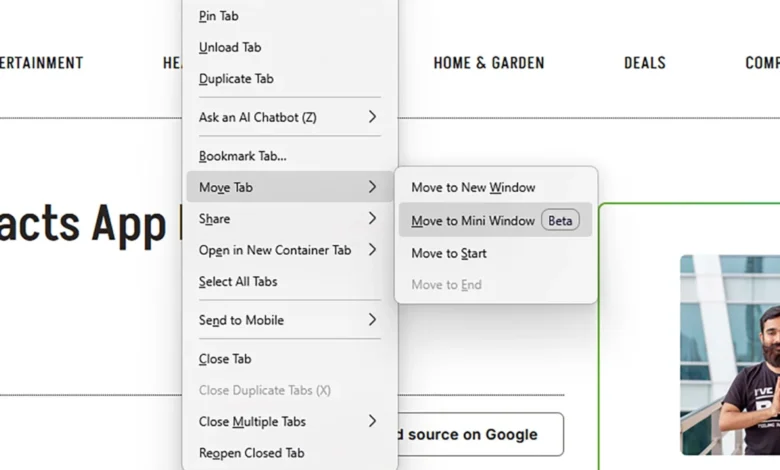
Mozilla has officially begun rolling out a transformative interface update for its flagship web browser, introducing a feature dubbed "Mini Window." Designed to fundamentally alter how users manage digital workspaces, the tool brings the familiar concept of picture-in-picture (PiP) video overlays to entire web pages. As modern web browsing increasingly requires juggling dozens of tabs, reference materials, live communications, and administrative forms simultaneously, Mozilla’s latest innovation aims to eliminate the friction of constant window-switching and inefficient side-by-side splits.
The rollout arrives as digital productivity tools face heightened scrutiny and demand. With remote and hybrid work models remaining standard across global industries, software developers are racing to optimize screen real estate—particularly for laptop users operating on restricted display dimensions. By detaching individual tabs into floating, persistent overlays, Mozilla is positioning Firefox as a primary contender in advanced multitasking efficiency.
Main Facts and Core Functionality
At its core, the Mini Window feature allows users to extract a specific browser tab or a selected section of a web page into a compact, floating window. Unlike traditional browser windows that can become buried beneath other applications or forced into cramped split-screen configurations, the Mini Window remains pinned on top of all active operating system windows.
According to official design documentation from Mozilla, the utility is tailored for scenarios where continuous visibility of a secondary source is paramount. Typical use cases include monitoring reference documentation while drafting long-form content, maintaining active chat windows, participating in video calls, or inputting data into complex web forms while cross-referencing external files.
When activated, the floating interface defaults to the lower-right corner of the user’s screen. Users retain full scrolling capabilities within the Mini Window, allowing them to navigate content seamlessly. However, to maintain intuitive interaction, any hyperlinks clicked within the overlay—whether manually selected or automatically triggered—will open within the primary browser view rather than spawning new tabs inside the restricted overlay space.
Furthermore, the interface utilizes a dynamic minimalism. Essential navigation controls—including forward, backward, and refresh buttons, along with the address bar and close toggles—remain hidden by default. They appear only when the user hovers the cursor over the window frame. The overlay is fully resizable by dragging its boundaries and repositionable across any coordinate of the display grid via its title bar, ensuring adaptability for diverse workflow preferences.

Chronology and Development Timeline
The genesis of the Mini Window feature can be traced back through Mozilla’s deliberate phased release methodology, which prioritizes community testing and telemetry collection before a mainstream commercial launch.
- Early Development and Internal Prototyping: Mozilla engineers began conceptualizing persistent web overlays as an extension of the browser’s existing picture-in-picture media architecture. Recognizing that users required similar persistent visibility for text-based resources, development teams prioritized the framework throughout mid-2026.
- Beta Release in Firefox Nightly (Late October 2026): The feature made its public debut within the experimental "Nightly" channel of the browser. This early-access environment allowed power users and developers to test the initial code base and report stability metrics.
- Community Feedback Phase (Early November 2026): Mozilla formally introduced the functionality to broader tech circles via developer forums and beta release notes, soliciting user experience reports concerning window anchoring, memory consumption, and UI responsiveness.
- Scheduled Stable Channel Integration (Late November 2026): Following rapid iteration based on Nightly user telemetry, Mozilla scheduled the official deployment of Mini Window for the general stable release of Firefox 160, marking its transition into the hands of millions of everyday consumers.
Background Context and Industry Landscape
The introduction of Mini Window arrives during a competitive era for desktop web browsers, where market dominance hinges on continuous user experience enhancements and workflow optimization. Google Chrome maintains a commanding share of the global browser market, followed by Microsoft Edge and Apple Safari. In recent years, browser manufacturers have heavily invested in tab management solutions—such as Chrome’s tab groups, Edge’s vertical tabs, and various third-party session managers—to combat the psychological and organizational toll of "tab overload."
Mozilla’s strategic pivot toward PiP-style web pages leverages user familiarity with existing desktop conventions. Picture-in-picture video has been a standard feature across major browsers for nearly a decade, training users to interact comfortably with floating UI elements. By applying this paradigm to general Hypertext Transfer Protocol (HTTP) content, Mozilla is effectively bridging the gap between desktop window management and in-browser tab hierarchies.
Industry analysts note that screen utilization has become a primary battleground for browser developers. As users increasingly rely on web-based SaaS (Software as a Service) applications rather than local desktop software, the browser has effectively transformed into an operating system within an operating system. Features that enhance spatial awareness and minimize cognitive switching costs are therefore critical for maintaining user retention.
Official Statements and Community Reactions
The reception within the developer and tech journalist communities has been largely positive, highlighting the practical utility of the tool.
Jack Wallen, technology analyst for ZDNET, emphasized the immediate ergonomic benefits of the rollout, noting that the feature provides a streamlined alternative to traditional multi-window setups, particularly for individuals operating on single-monitor configurations or compact portable workstations.
In an official community dispatch, Mozilla representatives outlined the philosophy guiding the release:

"Mini Window lets you move a tab, or a selected section of a page, into a compact window that stays on top of your other windows while you browse. It’s useful when you’re multitasking and need to keep a few sources of information in view at once: reference docs, a chat, a video call, a form you’re filling out."
Early testers on Mozilla Connect have praised the responsiveness of the overlay, though initial feedback also pointed toward requests for expanded customization options—such as adjustable opacity levels and the ability to pin multiple mini-windows simultaneously without cluttering the primary desktop space.
Broader Impact and Market Implications
The deployment of Mini Window carries several notable implications for the broader consumer technology ecosystem.
First, it establishes a new benchmark for accessibility and multitasking ergonomics. Users with visual impairments or those requiring constant auxiliary reference data stand to benefit significantly from a persistent, scaled viewport that does not require manual window resizing or alt-tabbing.
Second, the feature exerts competitive pressure on competing browser ecosystems. Google Chrome and Microsoft Edge, which frequently adopt successful UI innovations pioneered by open-source alternatives like Firefox or independent browsers like Vivaldi, may face user demand to implement native floating web page capabilities. Should Mini Window achieve widespread adoption among Firefox’s user base, it could accelerate industry-wide normalization of floating web frames as a standard browser utility.
As Mozilla prepares to push the feature from the experimental Nightly channel to the broader public in the upcoming stable release, the success of Mini Window will ultimately depend on its performance footprint. Efficient memory management and seamless rendering will be crucial to ensure that maintaining active floating overlays does not compromise overall system battery life or CPU performance—particularly on lower-specification hardware. For now, however, Mozilla’s latest undertaking represents a thoughtful, user-centric evolution in the ongoing effort to tame the chaos of the modern digital desktop.
Related posts: