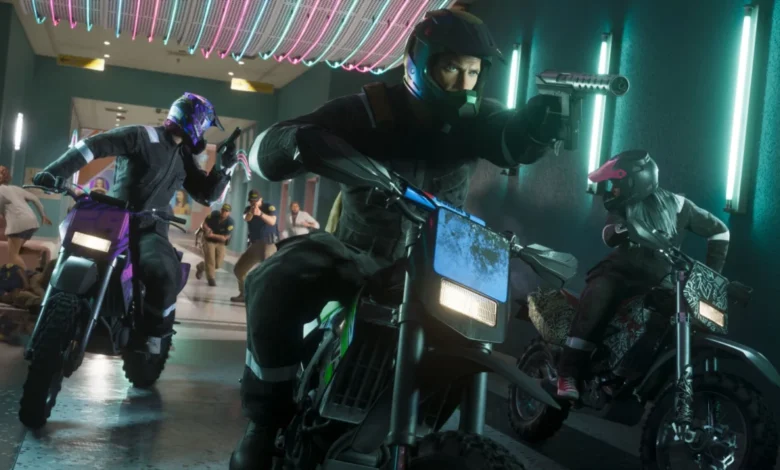
Grand Theft Auto VI stands as one of the most anticipated and complex open-world interactive entertainment releases in gaming history, pushing the technical and mechanical boundaries established by Rockstar Games over decades of development. While millions of players will undoubtedly experience the title through its primary gameplay loop—navigating the sun-drenched fictional state of Leonida, stealing vehicles, and executing scripted narrative missions and optional side quests—a deeper layer of mechanical depth remains obscured beneath the standard controller layout. Mastering these secondary inputs transforms the player experience, offering advanced tactical advantages, heightened environmental immersion, and granular control over the fictional ecosystem. Industry analysts and early technical breakdowns indicate that Rockstar Games has significantly expanded sandbox interactivity compared to its 2013 predecessor, Grand Theft Auto V. By examining ten of the most effective hidden controls and contextual key combinations available on standard console gamepads, players can unlock previously inaccessible dimensions of simulation, stealth, and NPC manipulation across the sprawling map of Leonida.
Chronological Evolution of Rockstar Sandbox Mechanics and Control Complexity
The inclusion of complex secondary control layers traces its lineage directly through Rockstar Games’ development history, evolving from the rudimentary pedestrian interactions of Grand Theft Auto III to the physics-driven realism of Grand Theft Auto IV and the expansive tripartite protagonist system of Grand Theft Auto V. With Grand Theft Auto VI, the development team has refined these mechanics to align with contemporary expectations of emergent gameplay and immersive sim design. Leonida, heavily inspired by modern Florida, presents diverse biomes ranging from dense urban centers to expansive swamplands and rural highways. The evolution of control inputs reflects a deliberate effort by developers to bridge the gap between cinematic storytelling and granular player agency, allowing for nuanced interactions that go far beyond standard combat and driving mechanics.
Activating Auto-Drive Mode for Automated Navigation Across Leonida
Navigating the vast distances of Leonida can occasionally demand prolonged transit times, prompting Rockstar Games to implement a robust automated transit feature. To utilize auto-drive mode, players must enter any standard vehicle and establish a precise destination waypoint on the in-game map interface, with distance scaling directly correlating to transit duration. Once the destination is mapped, holding the down arrow on the D-Pad while simultaneously pressing the Option button initiates cinematic camera mode. Following this input, holding the Circle button engages the automated navigation system, allowing the vehicle to autonomously traverse traffic rules and road networks toward the designated waypoint. This mechanic provides players with an opportunity to observe ambient traffic patterns, listen to expanded radio broadcasts, and evaluate regional geography without manual steering intervention.
Tactical Stealth: Ducking While Driving to Evade Law Enforcement
Law enforcement escalation remains a central pillar of the Grand Theft Auto franchise, and Leonida’s police forces respond to criminal activity with heightened tactical sophistication. Engaging in illegal operations rapidly attracts regional heat, leading to sustained vehicular pursuits. While acquiring a new vehicle serves as a primary method for shedding initial attention, law enforcement units retain the ability to identify suspects based on facial recognition and distinctive clothing until a wardrobe change is executed. To mitigate visibility during active pursuits, players can execute an in-vehicle stealth maneuver by holding the Circle button while operating a vehicle. This action forces the character to duck below the window line, reducing the line-of-sight detection radius from police cruisers and civilian observers alike and providing a critical window to reach a safehouse or isolation zone.
Environmental Interaction and Combat Proximity: Bike Kicks and Trash Talk

Drawing inspiration from classic arcade-style vehicular combat titles such as Electronic Arts’ historical Road Rash series, Grand Theft Auto VI incorporates integrated physical combat mechanics while operating two-wheeled transportation. By pressing the Square button while mounted on a bicycle or motorcycle, the player character executes a physical kick directed at adjacent pedestrians, rival cyclists, or opposing motorists. When executed from within an automobile, the same mechanical input forces the driver-side door open to strike nearby entities. Furthermore, players can interact verbally with non-player characters by depressing the right analog stick (R3), prompting the protagonist to direct situational trash talk toward nearby civilians, thereby shifting the ambient AI response state.
Contextual Rest, Environmental Observation, and Information Gathering
The density of Leonida’s population is reflected in complex diurnal routines and conversational loops among non-player characters. To facilitate passive observation and environmental engagement, Rockstar Games has introduced context-sensitive resting controls. Holding the Circle button allows characters to lean against structural walls or recline upon beachfront sand, while depressing the left analog stick (L3) enables characters to sit upon elevated ledges, park benches, and architectural structures. Utilizing these resting states not only allows players to appreciate the game’s advanced rendering engine and dynamic lighting systems but also provides a vantage point for listening to ambient NPC conversations. Industry observers note that paying close attention to these dialogues can yield valuable intelligence regarding hidden side quests, illicit financial opportunities, and localized lore across Leonida.
Interpersonal Provocation: The Unarmed Gesture System
Social friction within the game world can be actively manipulated through an expanded gesture system. When the player character is completely unarmed, holding the L2 button to focus visual attention on a specific NPC, followed by pressing the R1 button, triggers a provocative hand gesture colloquially known as flipping the bird. Given the enhanced behavioral AI systems implemented in Grand Theft Auto VI, this action carries immediate social consequences, frequently provoking aggressive reactions, verbal retaliation, or direct physical confrontations from civilians. Players are advised to weigh the tactical ramifications before deploying this input in high-security zones or densely populated public areas.
Advanced Situational Awareness: Utilizing the Rear-View Mirror Shortcut
During high-speed pursuits involving law enforcement agencies, hostile factions, or aggrieved civilians, maintaining spatial awareness is critical to survival. While traditional gameplay requires manual camera rotation to monitor pursuers, Grand Theft Auto VI features an integrated rear-view perspective shortcut. By holding the right analog stick (R3) downward, the camera instantly shifts to a rear-facing orientation, allowing drivers to monitor incoming projectiles, police cruiser positioning, and road obstacles without altering the forward trajectory of the vehicle.
Granular Vehicle Control: Headlights, High Beams, and Interior Mechanics
Vehicle customization and interaction extend beyond basic ignition and steering. Players can cycle through exterior lighting configurations by pressing the Circle button while driving, toggling standard headlights and high-beam intensities—a vital adjustment when navigating unlit rural roads or swamp trails during nighttime cycles. Additionally, holding the left arrow on the D-Pad while pushing the right analog stick upward opens a secondary vehicle control menu. This interface permits manual operation of hazard lights, window positioning, and interior climate systems, catering directly to players seeking heightened realism within the vehicular sandbox simulation.

Emergency Vehicle Operations and Siren Customization
Stealing emergency response vehicles, including police cruisers and municipal ambulances, presents a high-risk scenario due to elevated wanted levels; however, successful acquisition yields substantial tactical dividends. Beyond granting access to restricted weaponry and operational equipment, emergency vehicles allow players to utilize specialized sirens to clear civilian traffic during transit. To customize this feature, players who have successfully secured an emergency vehicle can hold the left analog stick (L3) upward while moving the left stick, cycling through a diverse array of distinct siren tones and electronic frequency patterns before engaging the primary audio output.
First-Person Inspection Mode for Environmental Clues
While Grand Theft Auto VI is fundamentally designed as a third-person action-adventure title, it incorporates a limited first-person inspection mode tailored for environmental investigation. By holding the L2 button and depressing the right analog stick (R3), the perspective shifts to a localized first-person viewpoint, restricting physical locomotion while allowing full 360-degree visual rotation. This input is specifically engineered for examining minute architectural details, localized posters, handwritten notes, and environmental clues hidden within residential interiors and exploratory points of interest across the map.
Fluid Parkour Integration: Hood Sliding Mechanics
To enhance pedestrian mobility and fluid transition across urban obstacles, Rockstar Games has integrated dynamic parkour animations into standard movement controls. When a player character sprints directly toward the front end of a parked or stationary vehicle and presses the X button, the character executes a fluid sliding motion directly across the vehicle hood. This animation provides a distinct velocity advantage over traditional running paths or jumping maneuvers, reducing traversal time in congested parking lots and high-density urban environments while reinforcing the cinematic aesthetic of the title.
Implications and Broader Impact on Open-World Game Design
The integration of these granular, often hidden mechanical controls underscores a broader evolutionary trend in open-world game design, moving away from rigid, single-path interaction models toward deeply simulated, systemic environments. Industry analysts suggest that by rewarding player curiosity and experimentation with nuanced controls, Rockstar Games is setting a new benchmark for sandbox immersion. As the gaming community continues to dissect the mechanics of Leonida following the title’s launch, these hidden inputs will undoubtedly serve as foundational elements for speedrunners, content creators, and casual players alike, permanently altering how virtual spaces are navigated and experienced.